My hot take? It’s absolutely worth it. 👍 I picked mine up for $99 on sale at Amazon. (It’s $109 at the time I’m writing this.) It features a combo sweep/mop function, similar to my iRobot Roomba j5+. Note: I have never used the mopping function on either yet.
Beyond the price as a differentiator, we have the “cliff detection” feature. In my experience, the Roomba will happily throw itself off a or down a flight of stairs. I’ve seen it do this on multiple occasions! As if it knew I was writing about it, my j5+ decided to act up today. After purchasing replacement brushes (because the old ones broke while trying to eat a bolt it gobbled up on the floor) the j5+ now just spins around in circles and throws error codes. I have a call in to iRobot support on this, but it’s just the latest in a string of problems with these things. No bueno.
Okay, so this is clearly an Amazon product name. Where else would you expect to find something named 2026 Wireless CarPlay Adapter for iPhone – No Audio Lag, 5s Auto-Connect- Convert Factory Wired to Wireless CarPlay – Bluetooth 5.3 & 5GHz Wi-Fi – Plug & Play (Includes USB A/C)? Prior to buying this unit this weekend, I have been using wired CarPlay with my Kia EV6. I love CarPlay! (I don’t care for the occasional failure of my phone and car to connect, which – thankfully – hasn’t happened for a while.) But I don’t like having to plug the phone in every time I get into the car, or disconnecting the cable when I get out. This is especially annoying in the winter when the car hasn’t warmed up and I have thick gloves on. Not a great experience.
Setup took about a minute. Simply pair the adapter like you would any new Bluetooth device and go. As for performance, I could not tell any difference between wired and wireless. No perceptible lag time.
The only drawback is now I need to use a separate USB port to charge the phone via its MagSafe adapter. Fortunately the EV6 has 4 charging ports under the media/climate controls cluster, so it’s not a problem finding a spare.
This is a worthwhile lifestyle upgrade. It’s so nice to get in to the car and be able to just drive with no fiddling with cables or phones. If you like CarPlay, you’ll LOVE wireless CarPlay!
At some point in the past I connected my Sonos system to HomeKit. I have no recollection of doing this, but obviously I did it because my Sonos speakers show up in my iOS Home app.
I have a range of Sonos equipment – some of it dating back to 2012. I started with a few Play:3s and a Play:5. Today I have Era 100s, Roams, a Beam, a couple of Amps, Play:3s, Play:1s, and Ones.
At the risk of jinxing myself, the system has been quite stable for the last year or so. I moved most of my older hardware to my place in Vermont, where there’s less wifi interference from neighbors, leaving most of my newer equipment in Massachussetts. Maybe the newer stuff handles wifi interference better? Not sure, but in the past, I regularly had to move the channels that my Sonos was on, and had frequent drops and other issues with AirPlay.
However, one issue had persisted. My Bedroom Era 100 would frequently fail to let me AirPlay to it. I would have to try again after a looooong pause where whatever I was trying to play from my iPhone would continue on in the background, silently, then it would fail. I would have to stop the podcast or music, rewind it, try again to AirPlay to the Era 100, possibly fail again, and then finally it would work. Alternately, I could just reboot the Era 100 and it would start to work immediately.
I opened a support ticket with Sonos on this. They directed me to move the unit and suggested it was wifi interference. I swapped the Bedroom Era 100 with the Bathroom 1 One. Remarkably everything worked fine. So if it was wifi interference, it would seem the older One was more tolerant of it, and the newer Era 100 was happier in the Bathroom. I swapped the room names in Sonos. Life was good.
For a day.
Then I told my phone to AirPlay to the Bathroom 1 speaker. I heard nothing. Then I listened closely and heard music… from upstairs… in the Bedroom. Hmm. I looked in my Sonos settings and, sure enough, the Era 100 thought it was in the Bathroom 1, and the One thought itself in the Bedroom. “Huh. I was sure I fixed that. Oh well.” I swapped the room names again.
And a day later, they had swapped back.
Because I can be stubborn, this pattern persisted for weeks. I would change the speaker room names, and they would change back. Finally, I logged a ticket with Sonos. The agent in chat helpfully suggested that my integrations (Alexa or HomeKit) could be to blame.
I went into my HomeKit settings and – sure enough, they had the wrong names. By this point – for some reason – only the Bedroom (Era 100) was an issue. As a result, I had two Bathroom 1 speakers (which is GREAT when you’re trying to rename or move things… “Wait… WHICH Bathroom 1 is this again?”
After much struggling – and failing – to rename the Bathroom 1 speaker, I ended up just deleting my Bathroom 1 room speaker altogether. Problem solved. Now when I tell my iPhone to AirPlay to Bathroom 1 or the Bedroom, I am (reasonably) confident that it will go to the right place. Phew. I have no speaker showing up in Bathroom 1 anymore, or the Bedroom, for that matter. And I don’t really care since I’ve never really used HomeKit to control my speakers.
This raises the question “if I DID want to use HomeKit to control my Sonos speakers (which I removed from HomeKit), how would I add them back?”
As I train for my second ultramarathon, the battery life – or rather, lack thereof – on the Apple Watch Ultra 2 has become a concern. Some days, despite my disabling all the fanciness on the Watch (cellular, wifi, enabling Airplane Mode, activating low power mode, and using an external Bluetooth heart rate monitor), battery life still drops at around 8-10% per hour. Do the math and that tells me I’ll get maybe 10 hours of battery life on a workout. As I prep for a 50 mile race with an anticipated 4-5 mile per hour pace, that cuts it awfully close to not having enough juice to finish. So at my coach’s recommendation, I picked up a Garmin Forerunner 955 Solar last week (at the time of this writing). Here’s my analysis so far.
Apple Watch features I miss:
A lot more than you’d think. Right off the bat I knew the Garmin would not have a lot of the “nice to have” features I’ve grown accustomed to on the Apple. A little background – I’ve owned a Apple Watch Series 2, 4, 6, Ultra, and Ultra 2, so it’s pretty integrated with my daily life.
Siri. I know, hard to believe with all the complaining I do about Siri, you wouldn’t think I miss it. But I do. The ability to invoke Siri and (sometimes) have it do what I want is a nice plus. record a voice memo, set a reminder. Simple things I took for granted on my watch are no longer available to me without another Apple device. Saying “Hey Siri, add Greek Yogurt to the Shopping list” to my Garmin does nothing. Huh.
Making a call. Sometimes it’s really convenient to make – or moreover, receive – a call from the Watch. Like, when I leave the phone over on the counter and go outside for a few minutes. Also, the ability to discretely call 911 is appealing.
Sending a text. Garmin has a “Messenger” app. I haven’t gotten it to work yet. I tried. I set up the app and gave it access to select contacts I want to be able to message. It insists I need to add contacts before I can send. Even though it fails far too often, I still regularly say “hey Siri, Message so and so” or “send so and so an audio message.” Can’t do that on the Garmin.
Tracking Medications. Rolling over in bed after popping a melatonin, it’s nice to be able to log that on the Watch, but now I have to pick up the phone and blast some blue light radiation into my eyes for a minute or two as I log it there.
Responding to notifications. Yes, I can get notifications on the Garmin, but I can’t respond to notifications. And that’s the important part – the responding. Also, when I clear a notification on the Garmin, I have to clear it again on the iPhone. Side note: some days, particularly with weak cell signal it seems, responses to various notifications go nowhere. Only after I look at my phone do I realize that replies I’d thought I’d sent vanished into the ether somewhere over Cupertino.
Another big one is responding to Authenticator apps. As I went to upload this post to my blog I was prompted for my MFA code. My Garmin helpfully told me I had a notification, and I needed to get up and walk across the room to confirm it was me on my phone.
Turn by turn navigation in the car. I really REALLY appreciate Apple’s haptic feedback on the watch when driving. Not an option with Garmin.
Remote control of playback. Now I have to yell across the room and hope Siri will hear me on my phone. (Note: Siri won’t hear me on the phone.) Again, a nice to have when the phone is not within easy reach, which is my preferred way of watching TV or a movie! Leave the phone away from the couch and let myself enjoy the movie is my preferred mode.
Home automation. Turn off the lights. Unlock the front door. See a picture of the person AT the front door. Can’t do that on the Garmin.
Better UI. So much easier to find things. I’m learning the Garmin interface, but it is far more complex. I’m learning it but it is nowhere near as intuitive as WatchOS.
Apple’s magnetic charging experience is so much nicer than the Garmin plug in method. It’s very old school and reminds me of a cell phone from the 90s. Fortunately I only have to do it every week or so.
Music. Amazon Music, Spotify, and Youtube Music have apps for the Garmin but you need to download them to the watch for playback. That kinda ruins the experience for me. It feels like it’s 2003 and I need to download files to my MP3 player before I leave the house. Given that I canceled the cellular plan on my Ultra because I always have my phone with me when working out, this is functionally the same. Generally I only have one playlist which I use as a metronome, so functionally this isn’t a big detractor.
Podcast apps. I use Overcast religiously in the Apple ecosystem. To play podcasts from the Garmin, I presume I would need to download them in advance via Spotify.
The display. Apple completely owns this. Even on their older, cheaper models, Apple’s tech makes the Forerunner feel like a Timex or Casio I wore in high school. It’s not even in the same hemisphere, let alone zip code. Maybe one of the more expensive Garmin lines like the Feenix has better, but the Forerunner 955 Solar’s display is not a contender.
Update 2025-08-10: Apple Pay! Apparently American Express is not set up for Garmin Pay. I use my Amex card exclusively for buying groceries. Now I have to use my iPhone or the physical card for this.
Update 2025-08-09: Replaceable bands. I have like 10 bands for my Apple Watch. I often swap them out more than once a day. With the Garmin, this is a process that requires a tiny flathead screwdriver or special tool to pry down the pins that hold the band to the watch. So instead of a simple process that takes 5 seconds, it’s now a process that takes five minutes and requires tools. I ordered this band from Amazon, which is like the Trail Loop for the Apple Watch.
Things I like about the Garmin Forerunner 955 Solar and/or Garmin Connect app:
Battery life. Hands down. No comparison. Apple, 36 hours is just a joke, even though I thought it a game changer when compared to 18 hours. Get some real athletes to use your product and see what they say. If Scott Jurek really uses the Ultra, it’s not to run 100 miles. (Okay, MAYBE Scott Jurek can outpace this thing’s battery on a 100 miler, but I sure as heck can’t.) This was the reason I bought the Garmin in the first place, and it does not disappoint.
Buttons! Yeah, sometimes buttons are better than a touch screen! Like when I’m hot and sweaty or accidentally trigger something on the Watch display. The only thing is there are 5 buttons and I’m still trying to wrap my head around which is which. While they do have their names etched into the case, unless I’m in bright light, I can’t see them.
Thanks to a third party app that my running coach uses, I can download workouts directly from their website to my Garmin account, which sends them to my Forerunner. On a day when they have a running workout scheduled for me, when I start a running workout, it asks if I want to do the one scheduled. This is much easier than creating a custom workout on the Apple Watch. Why can you only do this via the Watch itself? At LEAST let us do this from the phone. Better yet, allow us to import Garmin, Fit, and other format workouts into it.
There’s more in depth analysis in the Garmin Connect app than what I get in Apple Workouts. I like what I see here better than Strava, and I don’t have to pay Strava’s annual fee to see it. The presentation is not as pretty Apple’s Workouts app, but there’s more to drill in to.
The built in analysis of sleep and training recommendations are more useful on the Garmin. It takes a more proactive stance, not just telling me “you slept this many hours” but “you slept poorly and you may want to listen to your body before working out today.”
More actionable insights from Garmin. “Hey, you slept poorly. This may affect your performance. Maybe take a rest day, etc.” While I already know these things, I don’t always listen to my body and DO these things. Having a second opinion telling me “yeah, you could try to push through this, but you’re probably gonna regret it,” is huge for me.
Garmin seamlessly sends notifications from the Forerunner to my AirPods through the phone connection. I was very surprised when this first happened because I’d not paired my AirPods with the Forerunner, and yet when I started a run and got a mile down the road, a voice came over the music I was playing via my phone, gave me the lap update, and did not adversely affect playback. This is something Apple seems to get right sometimes, and completely fail other times. Sometimes the Watch will stop playback altogether to give me an update. Sometimes the Watch will give me updates for a few miles and then just stop for no reason. So far, the Garmin has not done this.
The Forerunner 955 Solar is noticeably lighter than the Ultra 2. Probably similar to the smaller Apple Watch Editions, but I noticed the difference immediately, and it’s less obtrusive when sleeping.
I was able to easily pair my COOSPO bluetooth heart rate monitor with the Forerunner. Unlike the Apple Watch, the Forerunner has a handy heart icon showing that it is paired, which saves me a trip into Settings > Bluetooth to double check that it’s connected to the Apple Watch.
Update 20250813:While sitting in a waiting room today I realized that not having the functionality of the Apple Watch forced me to sit quietly and gave me the opportunity to meditate for a few minutes. I couldn’t get my email or send a friend a text message without pulling out my phone, which I was able to resist. Not sure I would have been able to resist this on the Watch. In fact, I’m pretty sure I wouldn’t have. It reminds me of the Remarkable vs an iPad. Less functionality? Yes! But it’s purpose built with fewer distractions.
Things that are the same (or close enough to not matter to me)
Workout tracking. I start the workout and go. Pretty much the same except for days when I have a pre-set workout scheduled.
GPS navigation on the Garmin is comparable to my experience using the Footpath app on the Apple Watch. I’ve only used the Garmin once, on class four roads in Vermont, but it seemed much more accurate than Footpath has ever been on trails. Obviously this is not an apples to apples comparison, so maybe Footpath would do better on roads and Garmin would do worse on trails.
Apple’s safety features. Prior to his passing, I bought my father an Apple Watch SE because of its fall detection. Given that I run on slippery, rock-hewn trails and am a decent fall candidate myself, I gain a modicum of peace of mind having that too. However, I think the only times I’ve ever had my Apple Watch trigger a fall alert was when I was punching my boxing bag, or deliberately practicing breakfalls. The Ultra also has a siren that you can use to call for help if you think it’s near but they can’t locate you. Despite having this feature at my fingertips (or rather, on my wrist) for over two years, I’ve never even tried it. Gamin has an “incident Detection” feature which I have not yet tried.
Things that are just different
Garmin’s workout app has turn by turn navigation when I import GPSX files. On Apple I need to use a third party app like Footpath for this.
Syncing from the Forerunner to the Garmin Connect app is seamless and near immediate. Syncing to Strava and Apple Health, however, seems to happen twice an hour or so.
Connect workouts don’t push map data into the Apple Fitness app? What??
Garmin seems to think I am in better shape than Apple does. This could be because Apple has much more historic data and Garmin only knows me for the last week. But after just a week Garmin upped my fitness levels and max heart rate and calculated a lower resting heart rate than Apple. I like that. Also, I think I proved that with my latest time trial in which I moved significantly faster than the previous one a couple weeks ago. That said, there are many factors besides the gear, like temperature, terrain, air quality, sleep quality, nutrition, etc. not necessarily considered.
Things that are bad
The documentation for the Forerunner is sometimes wrong. The manual says to activate the Flashlight feature, hold the Light button and select the Flashlight icon from the list. There is no flashlight icon on the list.
I also tried to set a silent timer. When I teach yoga, I want my watch to vibrate when it’s time to switch poses, but I don’t want an audible beep to disturb my students. The manual gives steps to set up a timer and then says to hold the menu button to see options on said timer. Problem is, holding the button returns you back to the previous menu. to get options for the timer, you’re supposed to press but NOT hold said button.
So which do I like better? Given a choice, I would take an Apple Watch with a one week battery life over a Garmin. But given that the Apple Watch has been a thing for over a decade now, I am not holding my breath waiting for that to happen any time soon. I expect I’ll be a two-watch guy for as long as I’m an ultra marathon runner, using a Garmin for the long runs and sleep, and an Apple for pretty much everything else.
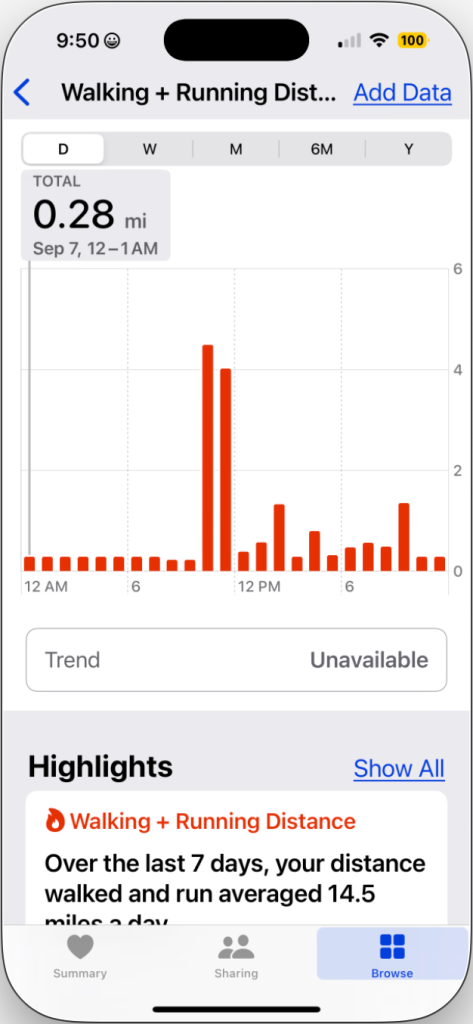
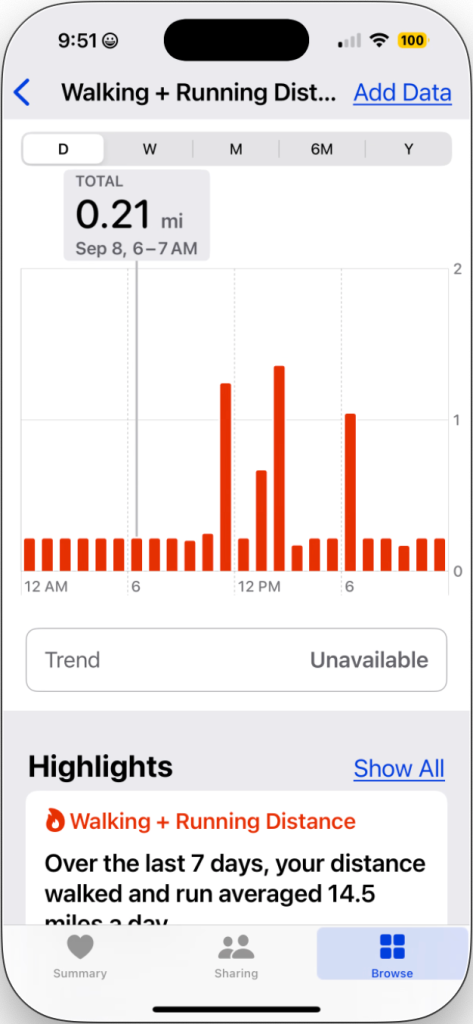
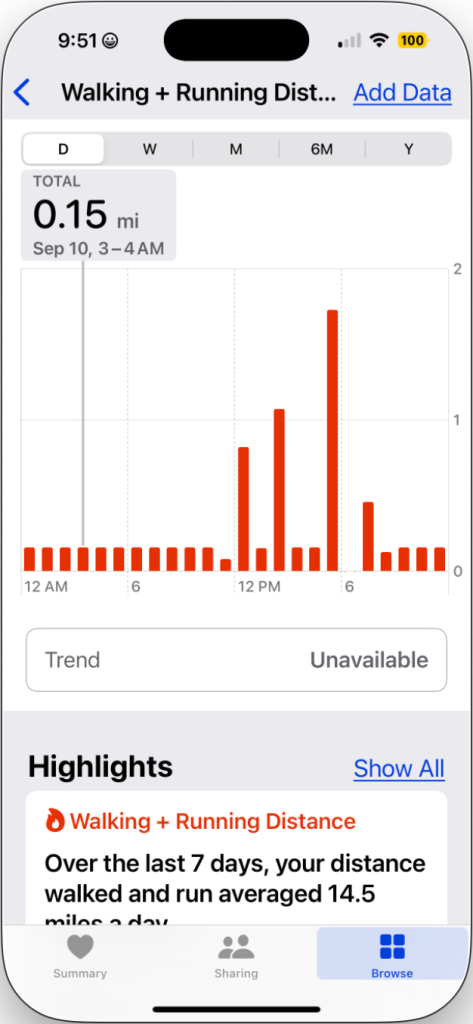
Update 20250912: I realized that my daily “Walking and Running Distance” in Apple Health seemed a little high. Looking back at my stats, I see that since the day I started wearing the Garmin, I have been accumulating as much as .28 miles PER HOUR every night. These distances are all the same every hour on any given day, although they vary from day to day. I reported the issue to Garmin support, and they replied with generic KB articles saying things like showering, restless sleep, or carrying a bag of groceries in the arm wearing the watch could cause this behavior. Then I sent them the screenshots below. They replied by saying they’re sending me a replacement.
Today, after leaving a meeting, one of my junior analysts said “I guess we need to lower the threshold for declaring an incident.” Intrigued, I asked what brought him to that conclusion. He said “well, our incident response plan says that we organize the team if more than ten computers are affected, but you just said that an incident is any event that indicates harm or malice.”?Realizing that further clarification was required, I resorted to my favorite tools: analogies and metaphors. I gave the example of?Captain America hearing a car alarm going off. This is just an event, and not yet an incident. Why? Surely if a car alarm is going off, something bad is happening, right? No, not necessarily. It could have been set off by the owner by accident, by a teenager zipping by on his skateboard and accidentally slamming into the car, or another car bumping into it while parking. While these are all (noteworthy?) events, none of them represent an incident in the security context because nothing really bad was happening, and there was no evil intent.
This is the equivalent of an analyst detecting an alert on the corporate SIEM. The analyst notes that there are a large number of failed logons occurring on a system. Investigating, he finds that they are all originating from a single workstation, which was unable to log on due to a recent password change. Is this an incident? No. Taking it to the next phase, let’s say that Cap does investigate, and he sees that the alarm was set off not by some passing skateboarder, but by a common street thug. Does Cap yell “AVENGERS, ASSEMBLE!?” No, not yet. Some two-bit thug trying to jack a car is well within Captain America’s ability to cope with without needing to call upon other members; you don’t call for Thor and Iron Man just because you’ve got them on speed dial, and Cap knows that.
This could be likened to the analyst detecting?malware on the affected system. Perhaps this?malware was trying a brute force attack against a random system on the network.?The analyst tasks the antivirus software to re-scan the system and do a cleanup, which it does successfully. Problem solved, with no need to bring on additional help. Even if the guy breaking into the car turns out to be Batroc, Cap doesn’t go crying for help, because he can has?handled?the likes on his own many times in his extensive career. But what if Batroc is not alone, and is accompanied by his brigade of super villains? This is where it gets a bit subjective. Being a seasoned incident responder, Cap is likely to attempt an immediate intervention in their nefarious activities, even though he’s outnumbered. However, if he starts to realize he’s being overwhelmed, Captain America is not too proud to reach out to a nearby resource like Bucky, the Falcon, or Spider-Man if he’s nearby. Since he has an established relationship with many other super-powered resources around the world, help is just a quick call away.
The analyst continues to investigate, and finds that there is malware on the affected system, and also notices alert that other nearby systems are apparently infected with the same malware. Contacting the department IT liaison, he finds that they are aware of the infection, which was passed around by a shared USB drive. Working together, the department contact and the analyst are able to clean up the malware before it spreads beyond the handful of machines. But, let’s say that Cap notices it’s not just an ordinary thug, and not even just Batroc’s Brigade, but it turns out that, for some reason – don’t ask why – it’s Ultron who has decided to steal this car. As a villain who has tried to destroy the world, and come awfully close to doing so, this is immediately dubbed a very serious incident.
Further investigation reveals that multiple systems have been infected, and are communicating to an external IP address in a remote location. There is now evidence that classified data is being exfiltrated from the network. It’s time to call on extra help. The incident response team, consiting of members of the networking, server administration, and department IT?teams, are notified, and a command center is established. The team immediately begins to compare notes to determine what is going on, and how to contain the threat. This is why?Captain America’s got not just Bruce Banner’s cell phone, Nick Fury’s SUV phone, and Tony Stark’s office number, but also Pepper Potts’ pager?(because she’ll be able to get a hold of Tony, regardless of what lady has caught his attention this evening). Cap also has a plan, which directs him to notify the regular members of the team.
This is why the incident response plan must be regularly updated to include a current list of contacts, the systems for which they are responsible, and their best contact methods. If it turns out that things are getting really bad, he may need to call upon a specialist. For example, since Ultron is (these days, anyway) made largely of vibranium, it may make sense to call upon someone with extensive knowledge of the precious metal – good thing Cap kept T’Challa’s Whatsapp handle at the top of his favorites! Now the Black Panther is only a hop, skip, and a jump away from joining the team. If other threats are encountered along the way, say, it’s found that Doctor Doom may be collaborating with Ultron, more help – in the form of the Fantastic Four – may be called upon, as they have extensive experience dealing with Victor von Doom, and can likely help contain the threat in a timely fashion.?
The organization maintains relationships with law enforcement, their ISP, and outside security firms who can supplement the incident response team if required. Calling on a professional services firm to assist with containing an advanced persistent threat may be called for, as well as notifying law enforcement or various government agencies, depending on the nature and scope of the breach that has occurred.
Is every day in the life of a security analyst as exciting as that of an Avenger? Probably not. But it can be fun, at times, especially if you like being a hero. If you think you have relevant skills or information that could be useful in a security incident, let?your local security team know, and ask how you could be of help during a crisis. Who knows? You may just get a snazzy, new ID card to carry around.
Deadpool, Captain America, Black Panther, The Thing, Invisible Woman, Mister Fantastic, The Human torch, Iron Man, Thor, Hawkeye, The Incredible Hulk, Black Widow, Falcon, Ultron, and Batroc are property of Marvel Comics.
Symmetry Series Folio for iPad Mini 4 Company:OtterBox Price: $59.95
I recently had the opportunity to evaluate and review the Symmetry Series Folio for iPad Mini 4 from OtterBox. This is a protective, wrap-around folio style case. In keeping with their reputation, the case is not one of the slimmest you can get, but definitely offers a lot in the way of protection.
Installation is simple, but took me several seconds to get all of the corners tucked in properly. This was comforting, as I knew that, once snugly inside, my iPad was not coming out by accident.
Data Rescue 4 Company:Prosoft Engineering Price: $0 – $299 I recently had the opportunity to review Data Rescue 4.2 from Prosoft Engineering, including a branded copy of their Bootwell USB thumbdrive. From the publisher’s website: Data Rescue is hard drive recovery software that can recover your photos, videos, documents from:
crashed, corrupted or non-mounting hard drives.
accidentally reformatted hard drive or reinstalled OS.
For several years, I have made it a practice to have separate email addresses (aliases) for separate purposes. This has made it easy for me to dispose of addresses when I no longer needed them – usually when I no longer wanted to receive emails from parties to whom I’d given the addresses. This also makes it easy to detect, and shut off mail from, companies that add you to their spam lists. Examples include online stores that I’d buy from ([email protected]), annoying realtors ([email protected]), and addresses I’d use in a variety of online forums ([email protected]). If you own your own domain name, or have a good email provider, this process is generally fairly simple.
Recently, I noticed I wasn?t getting any emails from Meetup.com. I?d just unsubscribed from a bunch of groups and changed others to not email me anymore, and since I hadn’t hosted any events in my group for some time, I didn’t think anything of it. As I’ve spent most of the last couple of months traveling, I did not miss the deluge of notifications of activities I wouldn’t be able to participate in anyway.
Separately from this, I had stopped receiving emails from American Express. I did not really notice this until I attempted to reset a password and never received the confirmation email that was to allow me to make the change. I sent myself a test email, and got it immediately, so I figured it was an issue on their end. As an alternative, I had Amex text me the confirmation code I needed, and promptly forgot about the email problem.
I also stopped receiving emails from Amazon.com, telling me my order had been received. But since I was getting text alerts of the package shipping and delivery status, I felt like I was still in touch with Amazon, so I didn’t think anything of it.
Finally, my financial advisor needed me to sign some electronic documents, and they kept emailing me, telling to sign them. I kept waiting for the forms, coming via Adobe’s document signing service, and they never arrived. Then I started to do some simple math and realize that we had a problem.
So I began to pay attention to this problem and troubleshoot it. My personal email was hosted at a budget hosting provider, and then forwarded to a Gmail account. I would send test emails to myself, and they would show up. I checked my junk mail folders, and searched everywhere, but could not find any recent emails from Amazon, Amex, Meetup, and other vendors, yet my tests came through! Why? Now that I was aware of the problem, I had to know, so after I’d exhausted all the troubleshooting I could do myself, I opened a chat session with my hosting provider. The results were astounding.
But first, a little background information. DNS – Domain Name System – is the service that translates somewhat human-friendly Internet site names, e.g., nikolaidis.com, amazon.com, and example.com, into computer-friendly numbers, e.g., 74.207.233.119, 72.21.194.212, and 93.184.216.119. There are several types of DNS records, and one of them is SPF, short for Sender Policy Framework. This began as a proposal several years ago to allow for some sort of authentication of email.
Most people probably do not realize that, in most cases, it is quite trivial for anyone to send email as just about any address they want, and unless the mail servers’ administrators take deliberate action, there’s nothing stopping this. This means that I can quite easily send an email to you as [email protected], telling you to click the link below to reset your password, and if you are gullible enough to do so, steer you to a phishing site where I steal your credentials. SPF is an attempt to combat email forgery, but allowing owners of domains to set up authorized lists of email servers that they can send email from. If the owner of the domain configures this, and the receiving mail server actually checks it, this can be an effective way to authenticate the sending server and allow or reject the email, based on its validity.
Back to my budget host. A couple of months ago, supposedly to comply with an ICANN regulation (which I do not buy for a second), my host made a change that enforces checking of SPF records. To prevent spoofing of emails, they will not forward any email for a domain that has an SPF record unless they are authorized to do so. This means that if I am not Amazon.com, my host will not forward emails claiming to be from Amazon.com. So far, so good.
Some mail systems have the concept of an alias, which is one way of saying “anything addressed to [email protected] goes to [email protected].” Another way to accomplish this is to set up an email forwarder, which is another way of saying “any emails that come here for [email protected] we will forward on to [email protected].” If the difference seems trivial, it can be. Essentially, forwarders are usually used to send email to a different mailbox or server, whereas aliases are both local to the same account on the same server. So if [email protected] and [email protected] are on the same server, you’d normally use an alias, but if Robert wanted his email to forward off to a Gmail account, he’d use a forwarder.
Here’s where things get stupid.
My budget host supports email aliases by using forwarding addresses only, not aliases. I would normally make up a forwarder for each purpose, and have that forwarded to my Gmail account. My host’s recent attempt to comply with a supposed ICANN directive means they will no longer “forward” an email unless the SPF records match. Since Amazon does not have an SPF record, saying that my email host is authorized to send email for them – why would they? – my host will not forward my email, which has landed in my mailbox, to my own external mailbox. “Okay,” I said, “I’ll set up a new, local account on my host, and have my forwarders forward to it, and then check that mailbox separately.” Nope, that won’t work either, as this is still considered a “forward” and my host won’t do that.
What?!?! When I heard that, I was astounded. Essentially, this host, which is a large, tier 1 hosting provider, has just killed the idea of aliases altogether. Their suggestions were for me to have Amazon set up an SPF record for my host mail server (Uh… no, you level 1 idiot, Amazon is not going to grant me the honor of sending email as Amazon to every one of their customers who wants to receive email from them), and for me to simply set up a new mailbox for each address I want. I have over 100 email aliases. So they want me to set up and check over 100 mailboxes now? I think not!
This is a case of good intentions gone horribly awry. I can only hope my host realizes the level of idiocy they’ve fallen to in their attempt to make things better. In the meantime, I’m moving my email to the one that we use and resell at work, which does not have this well-intentioned, yet stupid, restriction. As a result of my not receiving emails from Meetup.com for several weeks, I never got the email telling me that my dues were due again, and as a result, I lost control of my favorite Meetup group, which I’ve run for the past year. Fortunately, one of my fellow members pointed this problem out promptly and I was able to renew my subscription and reclaim my group. This is a relatively minor consequence, but it does not take a long stretch of the imagination to see more serious consequences coming from emails being unanswered for several months.
On the plus side, I realized that I was still receiving emails from Plenty of Fish, so I was able to use this as an opportunity to delete that forwarder. Advice to those of you who use online dating: avoid PoF. Trust me, eHarmony and OKCupid are better.
Years ago, we blogged about why having administrative rights over your computer is not the great thing that it sounds like. A recent study by Avecto underscores this point and reminds us why you don?t want them (all the time). The study states ?Analysis of Microsoft Security Bulletins from 2013 highlights that 92% of Critical vulnerabilities would be mitigated by removing admin rights across an enterprise.?
Translation: ?You can stop 92% of all of the bad stuff happening on your network by having to enter a password on those rare occasions when you need to install or update software on your computer.? Is that really so bad?

 I gave the example of?Captain America hearing a car alarm going off. This is just an event, and not yet an incident. Why? Surely if a car alarm is going off, something bad is happening, right? No, not necessarily. It could have been set off by the owner by accident, by a teenager zipping by on his skateboard and accidentally slamming into the car, or another car bumping into it while parking. While these are all (noteworthy?) events, none of them represent an incident in the security context because nothing really bad was happening, and there was no evil intent.
 Taking it to the next phase, let’s say that Cap does investigate, and he sees that the alarm was set off not by some passing skateboarder, but by a common street thug. Does Cap yell “AVENGERS, ASSEMBLE!?” No, not yet. Some two-bit thug trying to jack a car is well within Captain America’s ability to cope with without needing to call upon other members; you don’t call for Thor and Iron Man just because you’ve got them on speed dial, and Cap knows that.
 Even if the guy breaking into the car turns out to be Batroc, Cap doesn’t go crying for help, because he can has?handled?the likes on his own many times in his extensive career. But what if Batroc is not alone, and is accompanied by his brigade of super villains? This is where it gets a bit subjective. Being a seasoned incident responder, Cap is likely to attempt an immediate intervention in their nefarious activities, even though he’s outnumbered. However, if he starts to realize he’s being overwhelmed, Captain America is not too proud to reach out to a nearby resource like Bucky, the Falcon, or Spider-Man if he’s nearby. Since he has an established relationship with many other super-powered resources around the world, help is just a quick call away.
 But, let’s say that Cap notices it’s not just an ordinary thug, and not even just Batroc’s Brigade, but it turns out that, for some reason – don’t ask why – it’s Ultron who has decided to steal this car. As a villain who has tried to destroy the world, and come awfully close to doing so, this is immediately dubbed a very serious incident.
 If it turns out that things are getting really bad, he may need to call upon a specialist. For example, since Ultron is (these days, anyway) made largely of vibranium, it may make sense to call upon someone with extensive knowledge of the precious metal – good thing Cap kept T’Challa’s Whatsapp handle at the top of his favorites! Now the Black Panther is only a hop, skip, and a jump away from joining the team. If other threats are encountered along the way, say, it’s found that Doctor Doom may be collaborating with Ultron, more help – in the form of the Fantastic Four – may be called upon, as they have extensive experience dealing with Victor von Doom, and can likely help contain the threat in a timely fashion.?


 I recently had the opportunity to review Data Rescue 4.2 from Prosoft Engineering, including a branded copy of their Bootwell USB thumbdrive.